
Event List Calendar
A fully customizable HubSpot CMS module that displays filterable and searchable event listings with dynamic location and type filters, featuring responsive card layouts with date badges, event images, venue information, and registration links, all styled through an intuitive CSS custom properties system with configurable colors, spacing, animations, and typography.
Member Days
Spring Tournament
Junior Golf Clinic
Charity Scramble
Interactive Event Calendar with Smart Filtering
Transform your website into an event discovery hub with this beautifully designed, fully customizable calendar module featuring real-time search, dynamic filtering, and scroll animations that engage visitors and drive registrations.
Dynamic Filtering & Search
Quickly find relevant events with real-time search and smart filtering by location and event type, reducing the time visitors spend looking for the information they need.
Fully Customizable Design
Match your brand perfectly with comprehensive styling controls including colors, spacing, typography, shadows, and border radius—all editable directly in HubSpot without touching code.
Optimized Performance
Built with server-side rendering and smart image loading techniques that improve Core Web Vitals scores, resulting in faster page loads and better SEO rankings.
Mobile-Responsive Layout
Events look stunning on all devices with an adaptive layout that automatically adjusts card structure, image placement, and date displays for optimal mobile viewing.
Engaging Visual Animations
Choose from multiple scroll-based animation styles (fade-in, slide-up, scale-in) with customizable timing to create eye-catching presentations that keep visitors engaged.
Easy Content Management
Add unlimited events with a user-friendly repeater interface featuring inline text editing, optional images, registration links, and automatic chronological sorting—no technical expertise required.
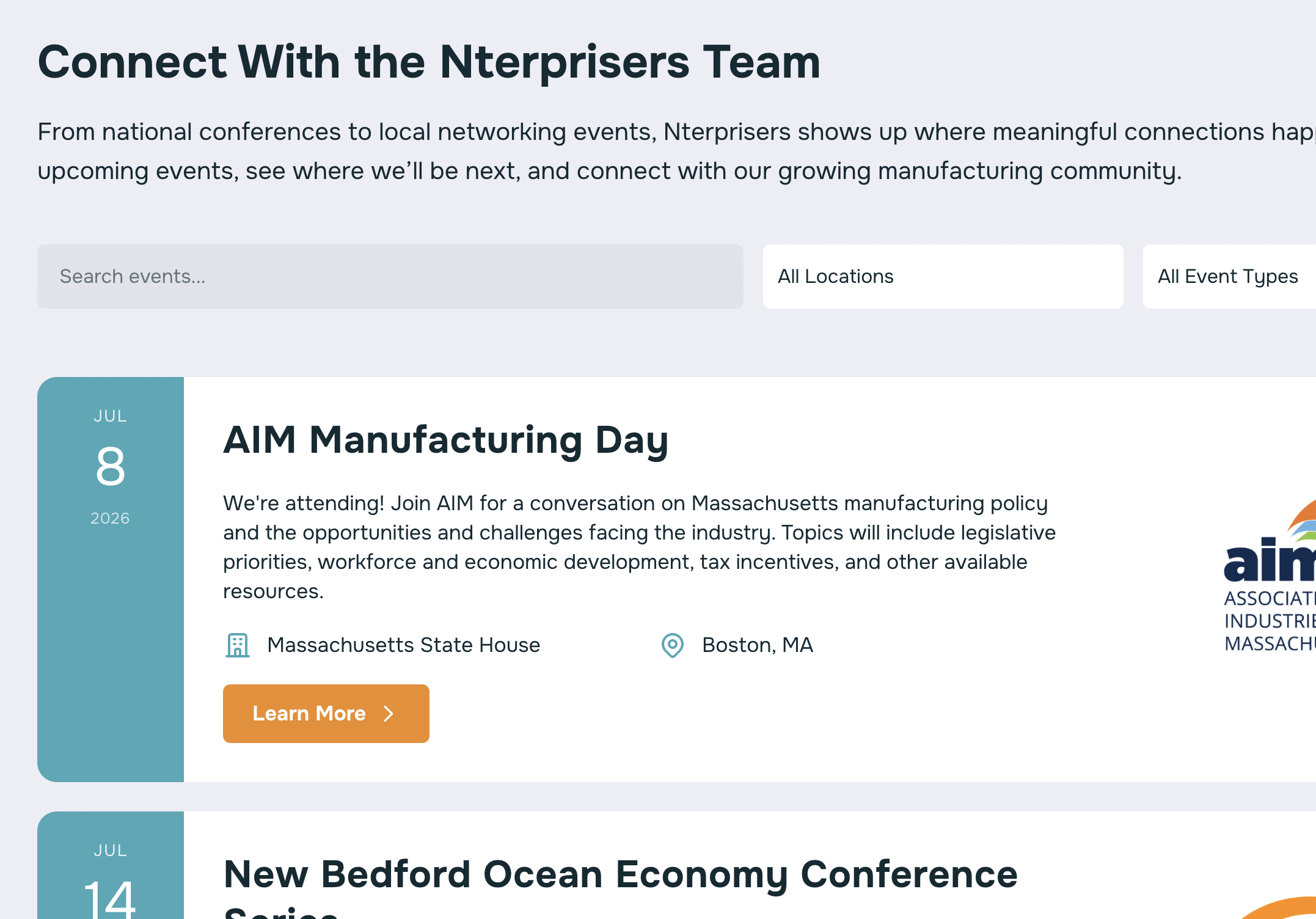
In The Wild
Here's examples of our events module in the wild thanks to all those who purchased it!
A Little Bit About How it Works
Need This Module Customized for Your Brand or Function?
(or any other module for that matter?)
Let A Design Link tailor this event calendar to your exact specifications—from custom color schemes and unique layouts to special features and integrations. Our HubSpot experts can modify any aspect of this module or build completely custom functionality to match your vision.
Purchase a development package and get:
- Expert HubSpot CMS customization
- Brand-perfect styling and design tweaks
- Custom feature development
- Performance optimization
- Ongoing support and maintenance
Perfect for module customization, theme development, and HubSpot CMS consulting.
Documentation
Event Calendar Module - Knowledge Base
Table of Contents
- Quick Start Guide
- Module Configuration
- Field Reference
- Styling & Customization
- Advanced Features
- Troubleshooting
- Technical Details
- Best Practices
Quick Start Guide
Installation
- Upload the
Event Calendar Module.modulefolder to your HubSpot Design Manager - Add the module to any page, landing page, or template
- Configure your events in the module editor
Basic Setup (5 Minutes)
- Add Events: In the Content tab, click "Add" under Events to create your first event
- Required Fields:
- Event Title
- Event Description
- Event Date (use the date picker)
- Venue Name
- Event Location
- Event Type
- Optional: Add an event image and "Learn More" link
- Publish: Save and publish your changes
First Event Example
Title: Annual Company Picnic
Description: Join us for food, games, and team building activities.
Date: June 15, 2025
Venue: City Park Pavilion
Location: Portland
Type: Community
Link: https://example.com/register
Module Configuration
Content Tab
Events Repeater
The Events repeater allows you to add unlimited events. Each event contains:
| Field | Type | Required | Description |
|---|---|---|---|
| Event Title | Text | Yes | Main heading for the event |
| Event Description | Textarea | Yes | Detailed description of the event |
| Event Date | Date | Yes | When the event occurs (auto-sorted) |
| Event Location | Text | Yes | City/region where event takes place |
| Venue Name | Text | Yes | Specific venue or building name |
| Event Type | Text | Yes | Category (Conference, Workshop, etc.) |
| Event Link | URL | No | Registration or info page URL |
| Event Image | Image | No | Visual for the event card |
Tips:
- Events automatically sort by date (earliest first)
- Use consistent capitalization for Event Types (see Gotchas)
- Leave Event Link empty if no registration is needed
- Images are optional but enhance visual appeal
Settings Tab
Search & Filters Section
Show Search
- Toggle to display/hide the search bar
- Search looks across: titles, descriptions, venues, and locations
- Real-time filtering with 150ms debounce for performance
Search Placeholder (Default: "Search events...")
- Customize the placeholder text users see in the search box
Show Location Filter
- Toggle to display/hide location dropdown
- Options auto-generate from your events' Location fields
- Sorted alphabetically
All Locations Label (Default: "All Locations")
- Customize the default "show all" option text
Show Type Filter
- Toggle to display/hide event type dropdown
- Options auto-generate from your events' Event Type fields
- Sorted alphabetically
All Types Label (Default: "All Types")
- Customize the default "show all" option text
Animations Section
Card Animation
- None: Cards appear instantly (best for accessibility)
- Fade In: Cards fade into view
- Slide Up: Cards slide up from below
- Scale In: Cards grow from 90% to 100% size
Animation Delay (Default: 100ms)
- Time between each card's animation
- Range: 0-500ms
- Lower = faster cascade, Higher = more dramatic effect
- Set to 0 for all cards to animate simultaneously
UI Messages Section
No Results Message (Default: "No events found matching your criteria.")
- Text shown when filters produce zero results
- Customize to match your brand voice
Style Tab
The Style tab contains 80+ customization options organized into logical groups:
Colors Group (15 fields)
- Card Background Color
- Card Hover Background Color
- Date Background Color
- Date Text Color
- Title Color
- Description Color
- Detail Icon Color
- Controls Background Color
- Controls Focus Background Color
- Controls Text Color
- No Results Message Color
- Button Background Color
- Button Text Color
- Button Hover Background
- Button Hover Text Color
Spacing & Padding Group
- Card Spacing (gap between cards)
- Card Content Padding (internal padding)
- Controls Margin (space below filters)
Card Styles Group
- Card Border Radius
- Card Shadow (toggle)
- Card Hover Shadow (toggle)
- Card Date Width
- Card Date Padding
- Card Image Width
- Controls Border Radius
Button Styles Group
- Button Padding Vertical
- Button Padding Horizontal
- Button Border Radius
- Button Font Weight
- Button Letter Spacing
Controls Styles Group
- Controls Gap (space between filter elements)
- Controls Input Padding
UI Messages Group
- No Results Padding
Styling & Customization
Color Scheme Presets
Corporate Professional
Card Background: #ffffff
Date Background: #012b4a
Date Text: #ffffff
Title: #1a1a1a
Description: #666666
Button Background: #012b4a
Button Text: #ffffff
Modern Vibrant
Card Background: #f8f9fa
Date Background: #6366f1
Date Text: #ffffff
Title: #1e293b
Description: #475569
Button Background: #6366f1
Button Text: #ffffff
Minimalist Dark
Card Background: #1f2937
Date Background: #3b82f6
Date Text: #ffffff
Title: #f9fafb
Description: #d1d5db
Button Background: #3b82f6
Button Text: #ffffff
Spacing Recommendations
Tight Layout (compact design):
- Card Spacing: 16px
- Card Padding: 24px
- Controls Margin: 24px
Standard Layout (balanced):
- Card Spacing: 24px
- Card Padding: 32px
- Controls Margin: 32px
Spacious Layout (airy feel):
- Card Spacing: 32px
- Card Padding: 40px
- Controls Margin: 40px
Responsive Behavior
The module automatically adapts at these breakpoints:
Desktop (>1024px)
- Cards: Date (120px) | Content (flex) | Image (customizable)
- Filters: Horizontal row
Tablet (768px - 1024px)
- Cards: Date (120px) | Content (flex) | Image (280px)
- Filters: Horizontal row
Mobile (<768px)
- Cards: Stacked vertical layout
- Filters: Stacked vertical (full width)
- Date: Overlays image (if image exists) or full-width horizontal bar (no image)
Advanced Features
Auto-Generated Filters
The module intelligently extracts unique values from your events:
How It Works:
- Module scans all events'
event_locationfields - Creates a unique, alphabetically sorted list
- Populates the Location dropdown dynamically
Example:
Events have locations: "Austin", "Portland", "Austin", "Chicago"
Filter shows: "Austin", "Chicago", "Portland"
Benefits:
- No manual filter configuration needed
- Automatically updates when you add/remove events
- Guaranteed accuracy (filters match actual data.
Smart Image Loading
The module optimizes image performance automatically:
First 2 Events:
loading="eager"- Loads immediatelyfetchpriority="high"- Browser prioritizes these- Improves Largest Contentful Paint (LCP)
Events 3+:
loading="lazy"- Only loads when scrolling near themfetchpriority="low"- Browser deprioritizes- Saves bandwidth and improves initial page load
Override: In the image field settings, you can manually set loading behavior per image.
Search Algorithm
The search function looks across multiple fields:
// Searches this combined string (lowercased):
"event title event description venue name event location"
Example: Searching "san francisco" will match:
- Events with "San Francisco" in Location
- Events at "San Francisco Convention Center" (Venue)
- Events with "san francisco" in the description
Case-Insensitive: Search automatically converts to lowercase for matching.
Animation System
Animations use Intersection Observer API for performance:
How It Works:
- Cards start with
opacity: 0and transform applied - When card enters viewport (with 50px margin)
- JavaScript adds
is-visibleclass - CSS transition animates to
opacity: 1and normal transform - Each card gets staggered delay based on its position
Performance:
- Only observes visible cards (filtered cards excluded)
- Unobserves after animation completes
- No scroll event listeners (uses native Intersection Observer)
Filter Combination Logic
All active filters use AND logic:
Search: "workshop"
Location: "Austin"
Type: "Workshop"

Result: Events that are Workshops AND in Austin AND match "workshop" in text
Empty filters are ignored (treated as "all").
Troubleshooting
Events Not Appearing
Problem: Added events but nothing shows on page
Solutions:
- ✅ Check that Event Date is in the future (or past, depending on your use case)
- ✅ Verify all required fields are filled
- ✅ Click "Publish" (not just Save draft)
- ✅ Clear browser cache and refresh
- ✅ Check for JavaScript errors in browser console (F12)
Filters Not Working
Problem: Selecting filters doesn't change visible events
Solutions:
- ✅ Ensure JavaScript is enabled in browser
- ✅ Check browser console for errors
- ✅ Verify Event Type values match exactly (see Case-Sensitive Filtering)
- ✅ Confirm filters are enabled in Settings tab
Images Not Loading
Problem: Event images show broken or don't appear
Solutions:
- ✅ Verify image URL is publicly accessible
- ✅ Check image
srcfield is not empty string - ✅ Ensure image is uploaded to HubSpot Files or accessible CDN
- ✅ Confirm image dimensions are set (width/height)
- ✅ Check for HTTPS (mixed content issues)
Styling Not Applying
Problem: Changed colors/spacing but nothing changed on page
Solutions:
- ✅ Hard refresh browser (Ctrl+Shift+R or Cmd+Shift+R)
- ✅ Clear HubSpot's cache: Design Manager → Actions → Clear cache
- ✅ Verify you're editing the correct module instance
- ✅ Check for CSS conflicts with theme styles
- ✅ Use browser inspector to verify CSS custom properties are set
Case-Sensitive Filtering
Problem: Filter dropdown shows duplicate types like "Conference" and "conference"
Solution: Event Type filtering is case-sensitive. Ensure consistent capitalization:
✅ Good (consistent)
Event 1: Type = "Conference"
Event 2: Type = "Conference"
Event 3: Type = "Workshop"
❌ Bad (inconsistent):
Event 1: Type = "Conference"
Event 2: Type = "conference"
Event 3: Type = "CONFERENCE"
Fix: Edit events and standardize capitalization (recommend Title Case).
Animation Performance Issues
Problem: Page feels sluggish with many events
Solutions:
- ✅ Set Card Animation to "None"
- ✅ Reduce Animation Delay to 0-50ms
- ✅ Limit events per page (use pagination or separate pages)
- ✅ Optimize image sizes (compress before uploading)
Mobile Layout Issues
Problem: Cards look broken on mobile devices
Solutions:
- ✅ Module automatically adapts - check actual mobile device, not just browser resize
- ✅ Clear cache on mobile device
- ✅ Verify Card Image Width isn't too large (recommended: 320px max)
- ✅ Check for theme CSS conflicts overriding
.blk_event-card
Technical Details
CSS Custom Properties
The module uses CSS custom properties for dynamic styling:
How It Works:
<div class="blk_events-list" style="--card-bg: rgba(255,255,255,1);">
  <div class="blk_event-card">
    <!-- Card inherits --card-bg variable -->
  </div>
</div>
.blk_event-card {
  background: var(--card-bg);
}
Benefits:
- Single source of truth for colors/spacing
- Browser-optimized performance
- Easy responsive overrides
- No repeated inline styles on every element
Server-Side Rendering
The module renders all HTML server-side with HubL:
What This Means:
- HTML is generated before page reaches browser
- Content is immediately visible (no JavaScript required)
- SEO-friendly (search engines see full content)
- Better Core Web Vitals scores
JavaScript Only Used For:
- Filtering (toggling visibility)
- Scroll animations
- Search debouncing
Performance Optimizations
- requestIdleCallback: Defers initialization until browser is idle
- Debouncing: Search waits 150ms after typing stops
- Intersection Observer: Efficient scroll-based animations
- Lazy Loading: Images below fold load on-demand
- DocumentFragment: Minimal DOM reflows when filtering
- CSS Transitions: Hardware-accelerated animations
Browser Compatibility
Fully Supported:
- Chrome 76+
- Firefox 68+
- Safari 13+
- Edge 79+
Graceful Degradation:
- Older browsers: No animations, but full functionality
- No JavaScript: Static list of events (no filtering)
- requestIdleCallback fallback: Uses
setTimeoutif unavailable
Accessibility Features
- ARIA Labels: All interactive elements labeled
- Screen Reader Only Text:
.blk_sr-onlyclass for context - Keyboard Navigation: All filters/links keyboard accessible
- Semantic HTML: Proper heading hierarchy
- Focus States: Visible focus indicators on controls
- Alt Text: Image field includes alt text option
Best Practices
Content Guidelines
Event Titles
- Keep under 60 characters
- Use title case
- Be specific: "Digital Marketing Workshop 2025" not "Workshop"
Event Descriptions
- Aim for 100-200 characters
- Front-load key information
- Include call-to-action when appropriate
- Avoid overly technical jargon
Event Types
- Use 3-7 consistent categories
- Examples: Conference, Workshop, Webinar, Community, Networking, Training
- Stick to title case
- Document your categories for content editors
Locations
- Use city name for consistency
- Avoid abbreviations: "San Francisco" not "SF"
- For online events, use "Online" or "Virtual"
Image Guidelines
Dimensions:
- Recommended: 800x600px (4:3 ratio)
- Minimum: 640x480px
- Maximum: 1920x1080px
File Size:
- Target: Under 200KB per image
- Use JPG for photos (better compression)
- Use PNG for graphics/logos
Alt Text:
- Describe what's in the image
- Keep under 125 characters
- Example: "Conference attendees networking in modern venue lobby"
Filter Configuration
When to Show Search:
- ✅ 10+ events
- ✅ Events have detailed descriptions
- ✅ Users need to find specific topics
When to Hide Search:
- ❌ Less than 5 events
- ❌ All events are similar
- ❌ Minimalist design preference
When to Show Location Filter:
- ✅ Events in 3+ different locations
- ✅ Users care about geographic proximity
- ✅ Regional audience
When to Show Type Filter:
- ✅ Events span 3+ categories
- ✅ Users have specific interests
- ✅ Mixed event types (workshops, webinars, conferences)
Animation Recommendations
None:
- Best for accessibility
- Professional/corporate sites
- Fast-paced user needs
Fade In:
- Subtle, elegant
- Works well with any design
- Safest choice for most sites
Slide Up:
- Dynamic, modern
- Good for creative agencies
- Best with longer delays (150-200ms)
Scale In:
- Most dramatic
- Use sparingly
- Best for fewer events (5-10)
Performance Best Practices
- Limit Events Per Page: Keep under 50 for optimal performance
- Optimize Images: Compress before uploading to HubSpot
- Use Lazy Loading: Enable for all images except first 2
- Minimize Animation: Consider "None" for large event lists
- Cache Strategy: Let HubSpot handle caching (don't disable)
SEO Best Practices
- Structured Data: Consider adding Event schema markup (requires custom code)
- Unique Titles: Each event should have distinct title
- Descriptive Content: Write detailed descriptions with keywords
- Internal Links: Link event links to relevant pages on your site
- Alt Text: Always provide alt text for images
Maintenance Checklist
Monthly:
- Remove past events
- Check for broken event links
- Update event images if needed
- Review filter categories for consistency
Quarterly:
- Audit event types (consolidate if too many)
- Review analytics for popular searches
- Test module on mobile devices
- Check load performance with tools like PageSpeed Insights
Annually:
- Review color scheme for brand alignment
- Update default events in fields.json
- Consider new features/customizations
- Archive old events to separate page
FAQ
Can I display events in a grid instead of a list?
The current module is optimized for a vertical list layout. For a grid layout, you would need to modify module.css lines 51-64 to use display: grid with multiple columns. This requires CSS knowledge.
Can I add a calendar view?
The current module only supports list view. A calendar view would require significant custom development including a JavaScript calendar library.
Can I export events to .ics calendar files?
This requires custom development. You would need to add a server-side function to generate .ics files from event data.
Can events repeat (recurring events)?
The current module doesn't support recurring events. Each instance must be added as a separate event.
Can I integrate with Google Calendar or Outlook?
This requires custom development and API integrations beyond the scope of this module.
How do I change the "Learn More" button text?
The button text is hardcoded. You can change it there, or contact A Design Link for a field-based solution.
Can I add more detail fields (e.g., price, capacity)?
Yes, but requires modifying and new fields and styling. Consider contacting A Design Link for this customization.
Can I password-protect certain events?
This would require HubSpot membership features or custom development beyond this module's scope.
Support & Customization
Getting Help
- Check This Documentation: Most questions are answered here
- HubSpot Community: Search for similar module questions
- Browser Console: Check for JavaScript errors (F12 → Console tab)
- HubSpot Support: Contact for platform-specific issues
Professional Customization
Need features not included in this module?
A Design Link offers custom development services:
- Add new fields or functionality
- Custom layouts (grid, masonry, timeline)
- API integrations (Google Calendar, Eventbrite, etc.)
- Custom filtering logic
- Advanced animations
- Multi-language support
- Schema markup for SEO
Purchase a development package and we'll modify this module to your exact specifications.
Contact: Visit A Design Link to discuss your project.
Changelog
Version 1.0 (December 2025)
- Initial release
- Dynamic filtering system (search, location, type)
- Three animation options
- Fully responsive design
- 80+ customization fields
- Server-side rendering with HubL
- Performance optimizations
- Accessibility features
- CSS namespacing with
blk_prefix
Document Version: 1.0
Last Updated: December 18, 2025
Module Version: 1.0
Maintained By: A Design Link